

- Studio Vektor
- Interactive eBooks
- Paychex: HCM Buyer’s Playbook
Case study · Interactive buyer’s guide
HCM Buyer’s Playbook, from brochure to buying tool
Buyer’s guides list what to look for and leave the reader to do the work. The interactive edition of Paychex’s playbook lets readers cost their admin time, build a requirements list and score vendors side by side, with demos of how AI and human expertise share the work.

- Publisher
- Paychex
- Original format
- 12-page PDF eBook
- Edition
- 6 chapters, 7 interactives, a quiz
- Status
- Independent portfolio demonstration
An interactive edition of an eBook Paychex published. The playbook’s text and figures are as published; the gists, deep-dive notes, tools, demos and quiz were written for this edition by Studio Vektor. Not commissioned by, affiliated with or endorsed by Paychex. Calculators use the playbook’s ranges; demos use sample data.


The starting point: a short buyer’s guide
The playbook explains what human capital management (HCM) software is, the operational problems it solves, how AI guided by human expertise fits in, and the questions to ask providers. In print it is 12 pages of copy, lists and photography, and the requirements and vendor questions are left for the reader to copy out.
The brief
A buyer’s guide should help someone buy. The edition had to turn the playbook’s advice into tools a buyer would actually use in an evaluation.
Make the cost visible
Show what fragmented tools and manual admin cost a team like the reader’s, using the playbook’s own ranges.
Show the AI, don’t describe it
Demonstrate how the assistant catches a payroll problem and how work is split between automation and experts.
Give buyers something to keep
A requirements list and a vendor scorecard that save in the browser and can be copied, downloaded or printed.
Who it is for
Business owners, HR leaders and finance teams choosing an HR and payroll platform.
Owners of growing businesses
See what tool sprawl and admin time cost before they talk to vendors.
HR leaders
Build a requirements list across eight areas and take it into demos.
Evaluation teams
Score two vendors against the playbook’s six questions.
From PDF to edition, chapter by chapter
The edition follows the playbook’s chapters in order.
| Chapter | The playbook’s point | In the interactive edition |
|---|---|---|
| Introduction | Juggling too many HR tools costs more and does less | A read-aloud introduction with word tracking and a tool-sprawl model |
| 1 · What is HCM? | The components of an HCM and where AI fits in | An admin-time calculator using the playbook’s range of 7.3–12.1 hours per HR administrator per week |
| 2 · Why do I need an HCM solution? | Operational challenges and catching problems early | A pay-period loop comparing reacting after payday with monitoring in real time, and a missing-punch demo |
| 3 · What’s next in HR tech | AI guided by human expertise | A sorter routing six situations to monitoring, automation or an expert |
| 4 · Choose tech that grows with you | Human-centered design and requirements | A requirements checklist of 35 items across eight areas |
| 5 · Questions to ask providers | What to ask when evaluating HCM providers | A vendor scorecard comparing two providers on six questions |
| 6 · Choose with confidence | Customer stories and next steps | Customer voices, a five-question quiz and the next step |
What Studio Vektor did
Turned the playbook’s advice into the working documents of an evaluation.
Costed the problem
A tool-sprawl model and an admin-time calculator turn the playbook’s statistics into numbers for the reader’s own team.
Demonstrated the assistant
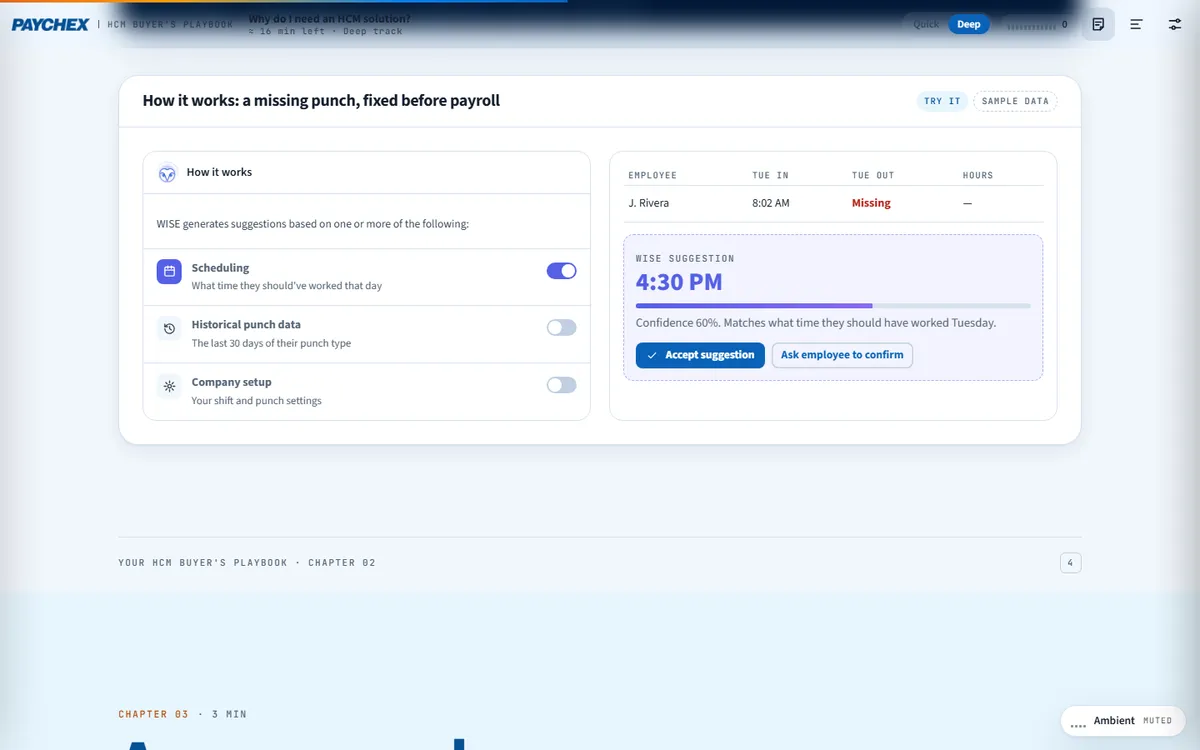
A missing punch is caught and fixed before payroll in a step-by-step demo with sample data.
Built the buyer’s kit
The requirements checklist and vendor scorecard save in the browser and export by copy, download or print.
Kept it human
A routing exercise shows which situations AI should monitor or automate and which an expert should decide, as the playbook argues.
Key interactives
Every chapter has something to try, and both reading tracks keep every tool.
| Interactive | Type | What the reader does |
|---|---|---|
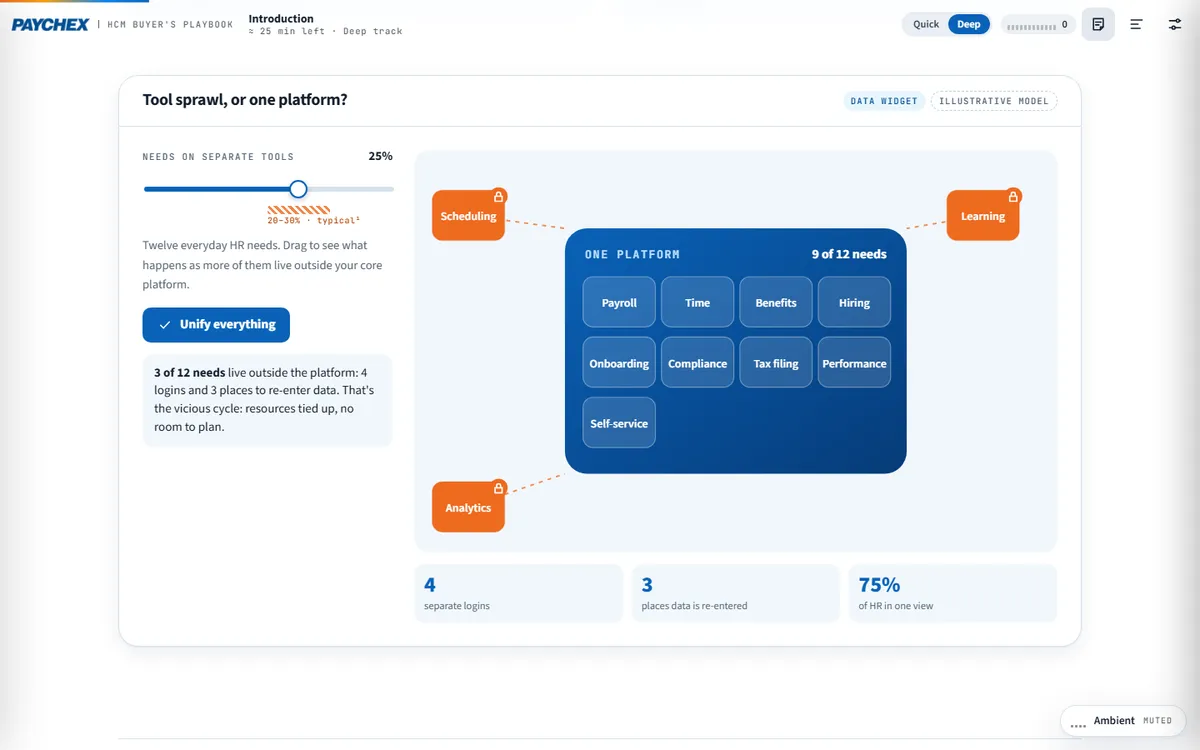
| Tool sprawl, or one platform? | Illustrative model | Drags the share of HR needs on separate tools and sees logins and re-entry add up |
| Admin time | Calculator | Enters HR admins and hourly cost to see admin hours and cost a year, using the playbook’s range |
| Catch problems early | Loop | Compares one pay period handled after payday and with real-time monitoring |
| A missing punch | Demo | Steps through how the assistant suggests a fix from schedules, punch history and company setup |
| Who should handle it? | Sorter | Routes six situations to monitor and flag, automate or expert decides |
| Requirements checklist | Builder | Selects from 35 requirements across eight areas, then copies, downloads or prints the list |
| Vendor scorecard | Scorecard | Rates two vendors on six questions and compares the totals |
| Five questions | Quiz | Checks what stuck from the playbook |
Reading experience and accessibility
Twelve print pages become one responsive guide that works as well on a phone as on a desk.
Two tracks
Quick keeps every tool, the core text and 30-second gists; Deep adds the deep-dive notes.
Listen along
A read-aloud introduction with word tracking, using the reader’s device voice.
Reading settings
Text size, Auto, Light, Dark and Sepia themes, dyslexia-friendly type (Atkinson Hyperlegible) and bionic emphasis.
Saved work
The requirements list and scorecard save in the browser, so a buyer can come back between demos.
Announced results
Fifteen live regions announce calculator and scorecard results.
Print and export
A print stylesheet plus copy and download for the requirements list.
Design system
Paychex blue and orange, with a violet accent for everything the assistant does.
- Paychex blue
#065195Headings and brand - Bright blue
#0782EDActions and selections - Orange
#EE6A1FCalls to action and alerts - Assistant violet
#5560E6Anything the AI assistant does - Night
#0A1B33Dark panels
Type
Source Sans 3 for display and reading, JetBrains Mono for figures and labels, and Atkinson Hyperlegible for the dyslexia-friendly mode.
The assistant has a color
Every demo of the AI assistant uses the same violet, so readers can tell at a glance what the AI does and what people do.
Sources under the numbers
Calculators cite the playbook figure they use, and illustrative models say so.
How it’s built
Product names and features change. The build keeps copy, tools and demo data separate so each can be updated alone.
| Aspect | Approach |
|---|---|
| Delivery | One self-contained HTML file (about 550 KB) with its images embedded. No platform, plugin or reader app. |
| External requests | The web fonts, with system-font fallbacks, and a page-view analytics tag |
| Narration | The reader’s device voice through the Web Speech API, with word or sentence tracking |
| State | Answers, progress and settings saved in the reader’s browser |
PDF vs interactive edition
The PDF explains what to look for. The edition helps a buyer do the looking.
| Question | Original PDF | Interactive edition |
|---|---|---|
| What is admin costing us? | A range of hours per week | Our hours and cost a year |
| How does the AI help? | A description | A step-by-step demo with sample data |
| What do we need? | A list of features | A saved requirements list to export |
| Which vendor is better? | Questions to ask | A scorecard comparing two vendors |
| What do we take to the meeting? | The PDF | A printed or downloaded list and scorecard |
What we would measure
This edition is an independent demonstration with no audience data, and we don’t report results for it. For a software vendor, the buyer’s choices describe the deal before the first call.
Requirements
Which of the 35 requirements buyers select, by area.
Team size and cost
Calculator inputs show the size and pain of the reader’s HR function.
Evaluation stage
Readers who complete a scorecard are comparing vendors now.
Where this approach fits
Buyer’s guides become far more useful when the buyer can work in them.
Software buyer’s guides
Requirements builders and scorecards that buyers take into demos.
Product explainers
Step-by-step demos that show a feature with sample data.
ROI guides
Calculators built on the guide’s own published ranges.
FAQ
Common questions about this edition and projects like it.
Was this edition commissioned by Paychex?
No. It is an independent portfolio demonstration built from an eBook Paychex published. The playbook is Paychex’s; the editorial layer, interactions, design and build are Studio Vektor’s.
Do the calculators use real data?
They use the playbook’s published ranges and the reader’s own inputs. Demos use sample data and are labelled as illustrative.
What would an edition like this cost?
Interactive eBooks start from $635, and the Advanced package with one defined quiz or scoring tool and interactive charts starts from $1,170. An edition at this depth, with calculators, demos, a saved requirements builder and a scorecard, goes beyond those packages and is quoted on scope after we see your document.
Can the requirements list feed our sales team?
In this demonstration it stays in the reader’s browser. In a commissioned edition, the list and scorecard can be sent to a form or your CRM with the reader’s consent.
Publishing a buyer’s guide?
Turn your guide into the buyer’s working tool.
Buyer’s guides, checklists and evaluation frameworks work well. Send the PDF and we’ll show you how.